Saturday, June 15, 2019

How to Manage the Protected AEM Resources through OAuth 2.0 | OAuth 2.0 Server Functionalities in AEM — Deep Dive

This tutorial explains how to use Adobe Granite OAuth 2.0 Server functionalities to grant resource access to external clients in AEM(Adobe Experience Manager).

The OAuth 2.0 protocol allows the users to grant a third-party web site or application access to the user's protected resources without necessarily revealing their long term credentials or even their identity.

OAuth 2.0 allows clients to access user’s (resource owner’s) resources on resource servers via authorization servers in a secure, reliable, and efficient manner.

Adobe granite OAuth 2.0 server implementation(com.adobe.granite.oauth.server) provides the support for OAuth 2.0 server functionalities in AEM.

Access tokens are the thing that applications use to make API requests on behalf of a user. The access token represents the authorization of a specific application to access specific parts of a user’s data. The external application should receive the access token to access the protected user resources from AEM.

Grants

The OAuth 2.0 specification describes a number of grants (“methods”) for a client application to acquire an access token (which represents a user’s permission for the client to access their data) which can be used to authenticate a request to a protected resource.

The Granite OAuth Server supports the below grant types

  • Authorization Code

Authorization Code:

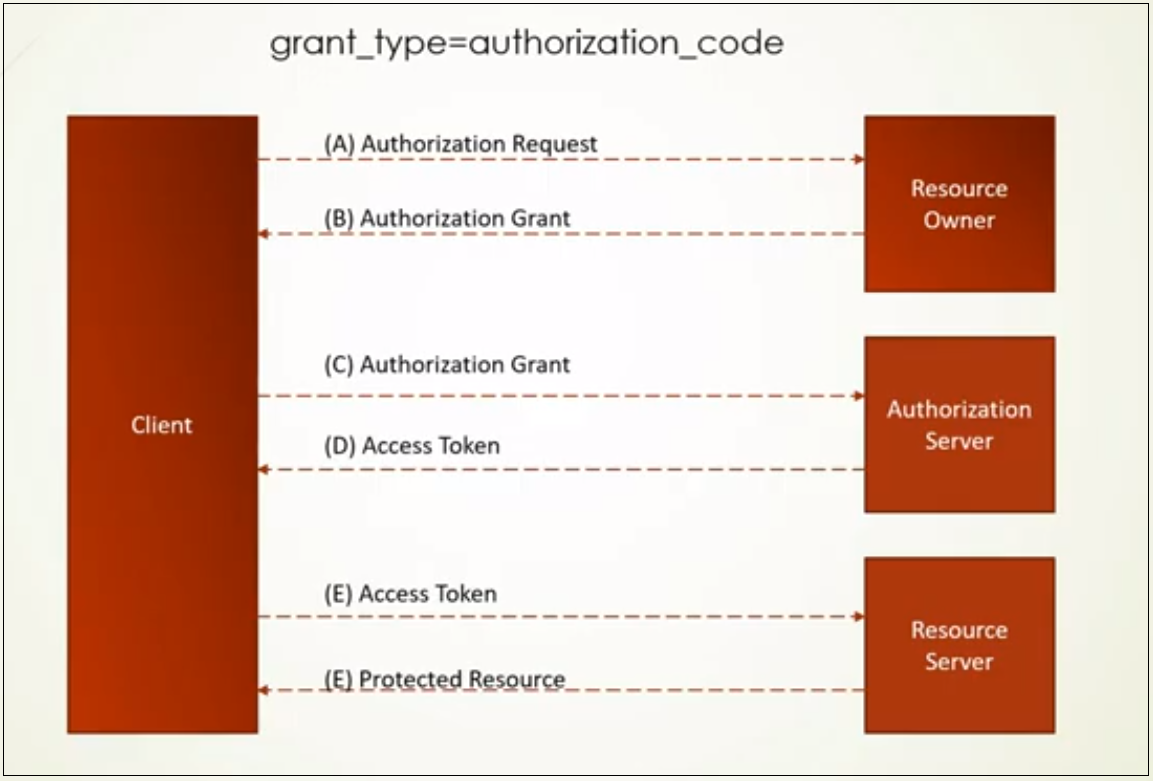
The authorization code is a temporary code that the client will exchange for an access token. The code itself is obtained from the authorization server where the user gets a chance to see what the information the client is requesting, and approve or deny the request.

When the user authorizes the application, they are redirected back to the application with a temporary code in the URL. The application exchanges that code for the access token. When the application makes the request for the access token. The application retrieves the required resources through the access token, the access token is short-lived e.g 1 hr.

oauth-server-functionalities-in-aem

Refresh Token

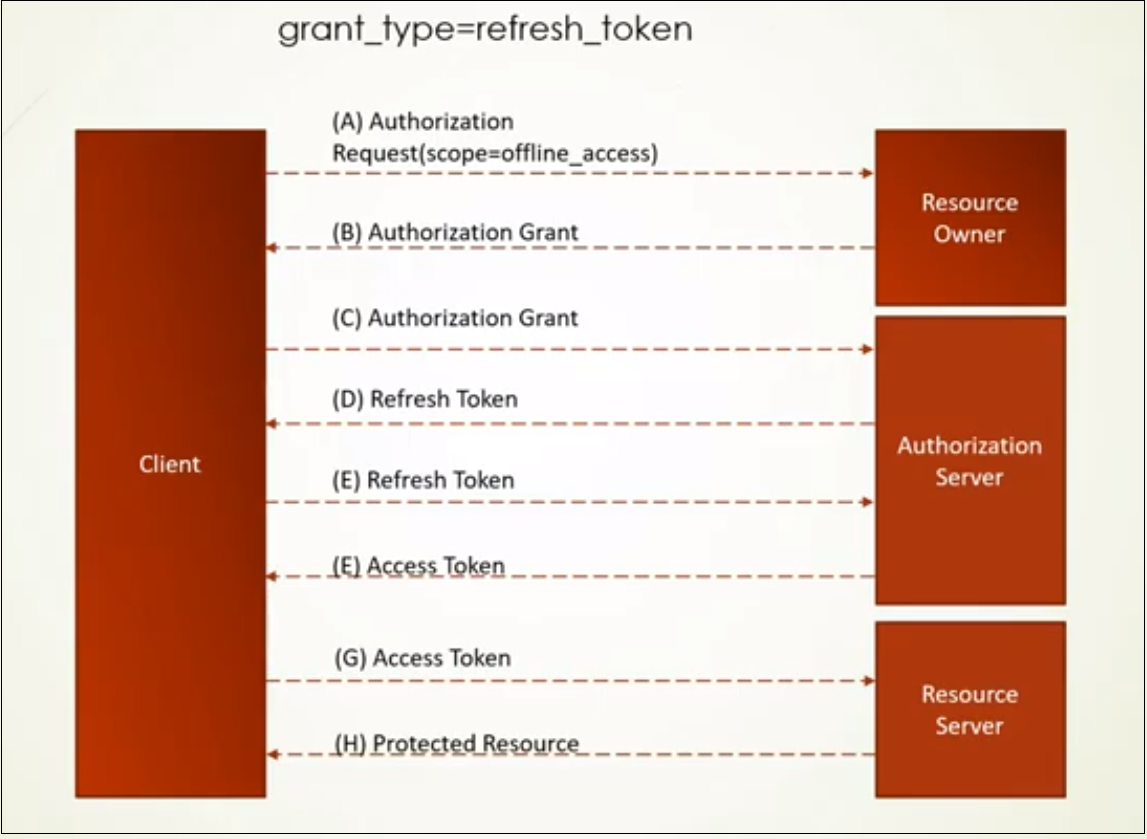
The Refresh Token grant type is used by clients to exchange a refresh token for an access token when the access token has expired.

This allows clients to continue to have a valid access token without further interaction with the user.

The user grants the approval once to get the refresh token, subsequently, the application request the access token whenever required and access the required resources without the user's online interaction.

oauth-server-functionalities-in-aem

JWT Bearer Token

JWT Bearer Token is mainly used for server to server integration, this will helps us to enable the server to server integration without the resource owner interaction e.g retrieve or upload files without user interactions.

The client forms the JWT Token with specific configuration data, the token should be signed by the AEM OAuth Client private key, and exchanges the token to the server to get the access token, the access token can be used to retrieve the protected resources.

Image for post

Scopes

The scope is a mechanism in OAuth 2.0 to limit an application’s access to a user’s account. An application can request one or more scopes, this information is then presented to the user in the consent screen, and the access token issued to the application will be limited to the scopes granted.

The default scopes supported in AEM

  • Profile — Get the basic profile details on user authorization.

Custom Scopes

AEM supports to define custom scopes to provide additional access to the external applications, the extensible OAuth scopes allow access control the resources from a client application that is authorized by an end-user.

To define the custom scopes

  • Define a class implements com.adobe.granite.oauth.server.Scope or com.adobe.granite.oauth.server.ScopeWithPrivileges, extended Scope interface for scopes that defined required privileges on their content paths. The privileges defined in the scope will be created by the OAuth Server using the oauthservice user. It is the responsibility of the scope developer to ensure that oauthservice has the necessary privileges to do this.

OAuth End Points

OAuth Client Registration — http://localhost:4502/libs/granite/oauth/content/clients.html

Resource Owner Authorization Page — http://localhost:4502/oauth/authorize?response_type=code&client_id=<ClientId>&scope=<scope>&redirect_uri=<Redirect URI>

Token End Point — http://localhost:4502/oauth/token

Profile Data — http://localhost:4502/libs/oauth/profile

Revoke Token — http://localhost:8080/libs/granite/oauth/revoke

Let us now enable the required configurations to enable different scenarios.

Enable OAuth Server Authentication Handler

As a first step enable the OAuth Server Authentication Handler, by default AEM won't enable the OAuth Server Authentication handler.

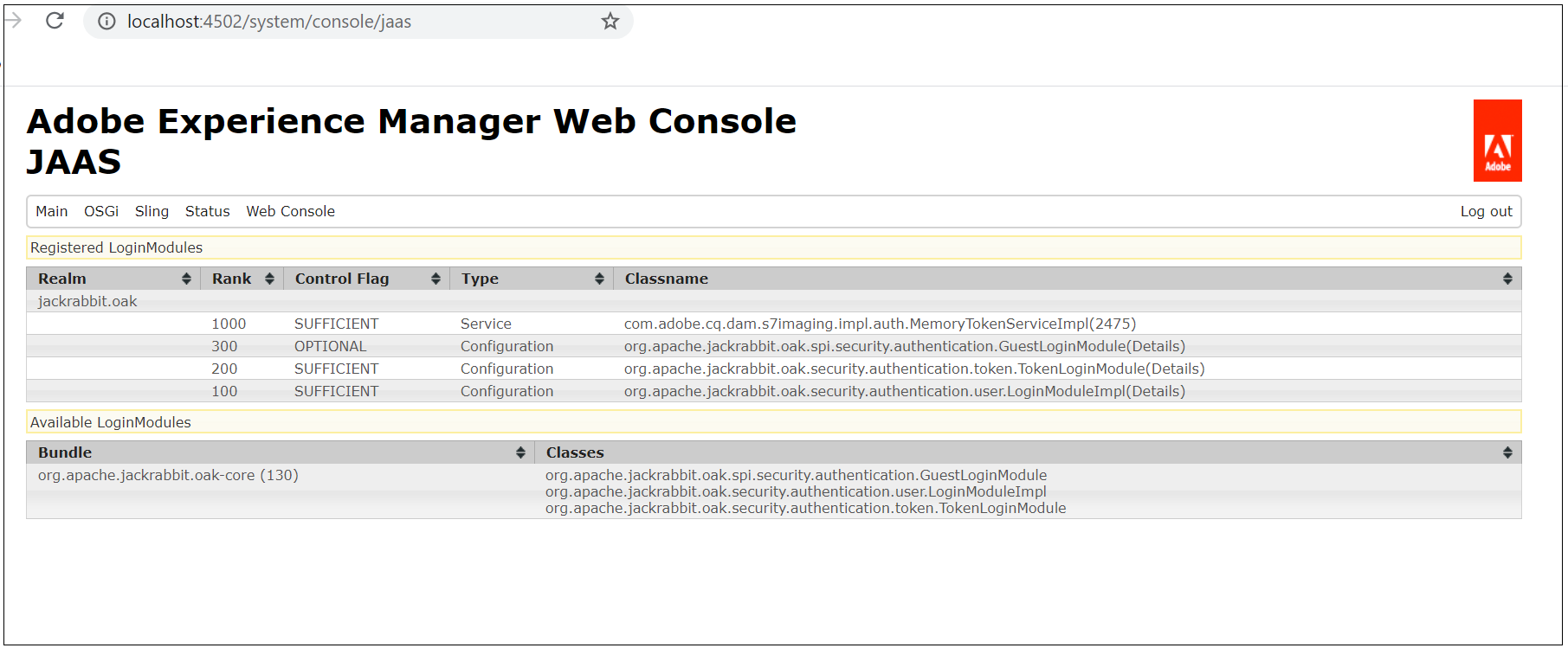
System Console →Main →JASS

Image for post

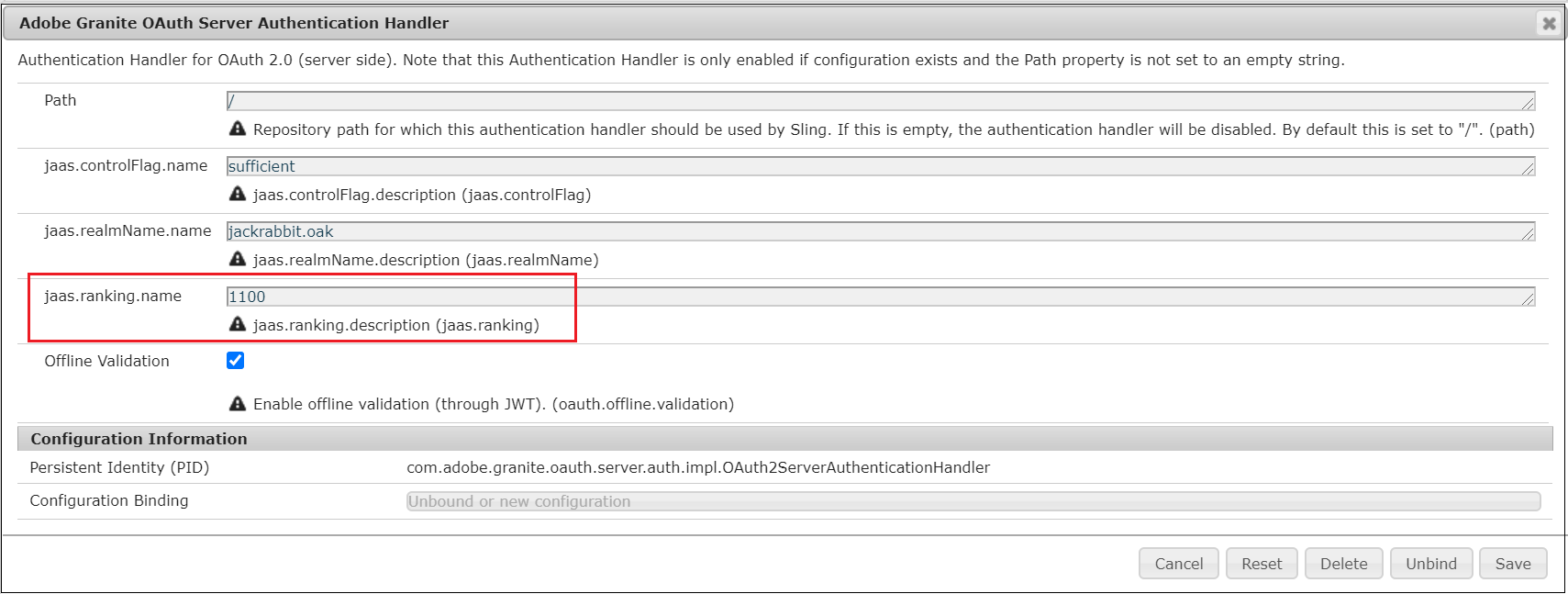
To enable the OAuth Server Authentication Handler, change the “jaas.ranking.name” value to 1100 in “Adobe Granite OAuth Server Authentication Handler” and save the configuration — http://localhost:4502/system/console/configMgr/com.adobe.granite.oauth.server.auth.impl.OAuth2ServerAuthenticationHandler

oauth-server-functionalities-in-aem

OAuth Server Authentication Handler is enabled now.

oauth-server-functionalities-in-aem

Register OAuth Client

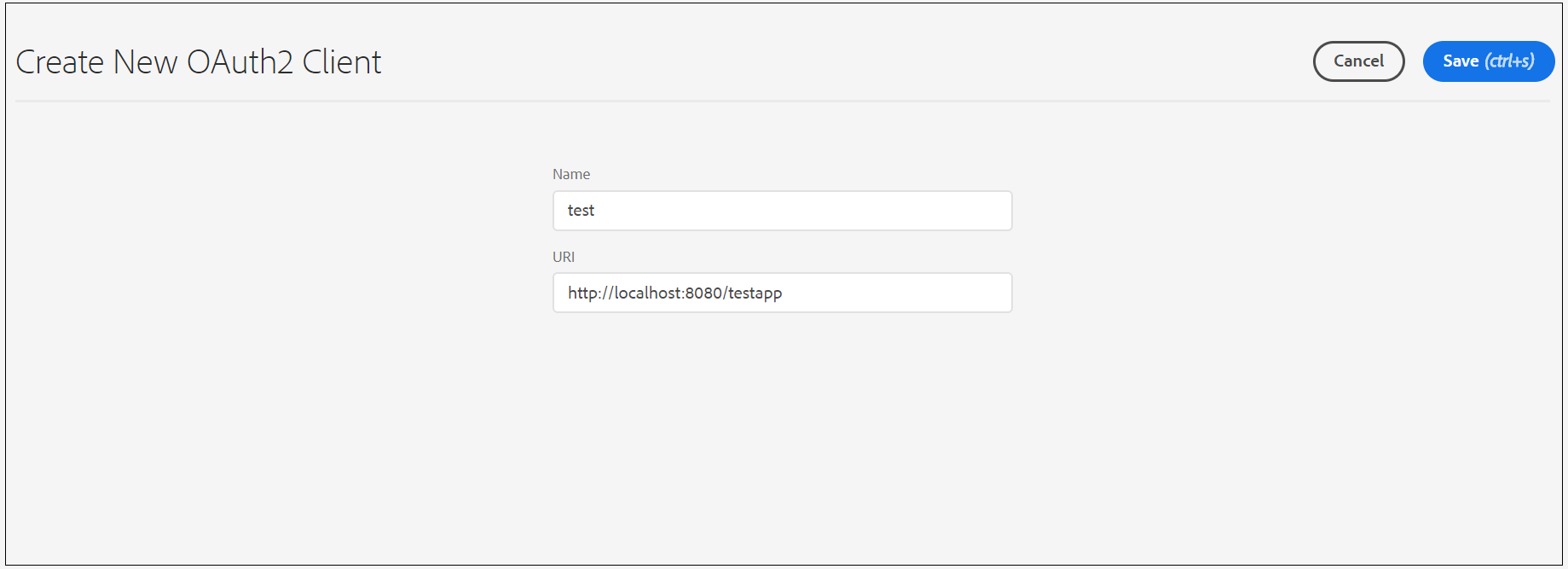
Register a new OAuth client through http://localhost:4502/libs/granite/oauth/content/clients.html — every external application requires OAuth authentication should be registered as a OAuth client in AEM.

Enter a name and redirect URI — After a user successfully authorizes an application, the OAuth server will redirect the user back to the application with an authorization code to the configured redirect URL.

oauth-server-functionalities-in-aem

Copy the client id and client secret and keep them safe.

oauth-server-functionalities-in-aem

Setup Demo User

Setup up a demo user with all possible profile data and required permissions — complete read-only access and full access for “/content/dam/digital”

oauth-server-functionalities-in-aem

Profile Data

Let us now see how to retrieve the profile data of the user.

As a first step, access the authorization URL(in real scenario redirect the user to authorization URL when the user clicks on a link in the application) — http://localhost:4502/oauth/authorize?response_type=code&client_id=jgqd0beimj5q4ofi281cc56i6a-_d-xzn-e&scope=profile&redirect_uri=http://localhost:8080/testapp

If required, pass an additional parameter with name state with any random value e.g state=AlbinTest, the same state value will be returned in the response. This will helps us to verify the integrity of the data.

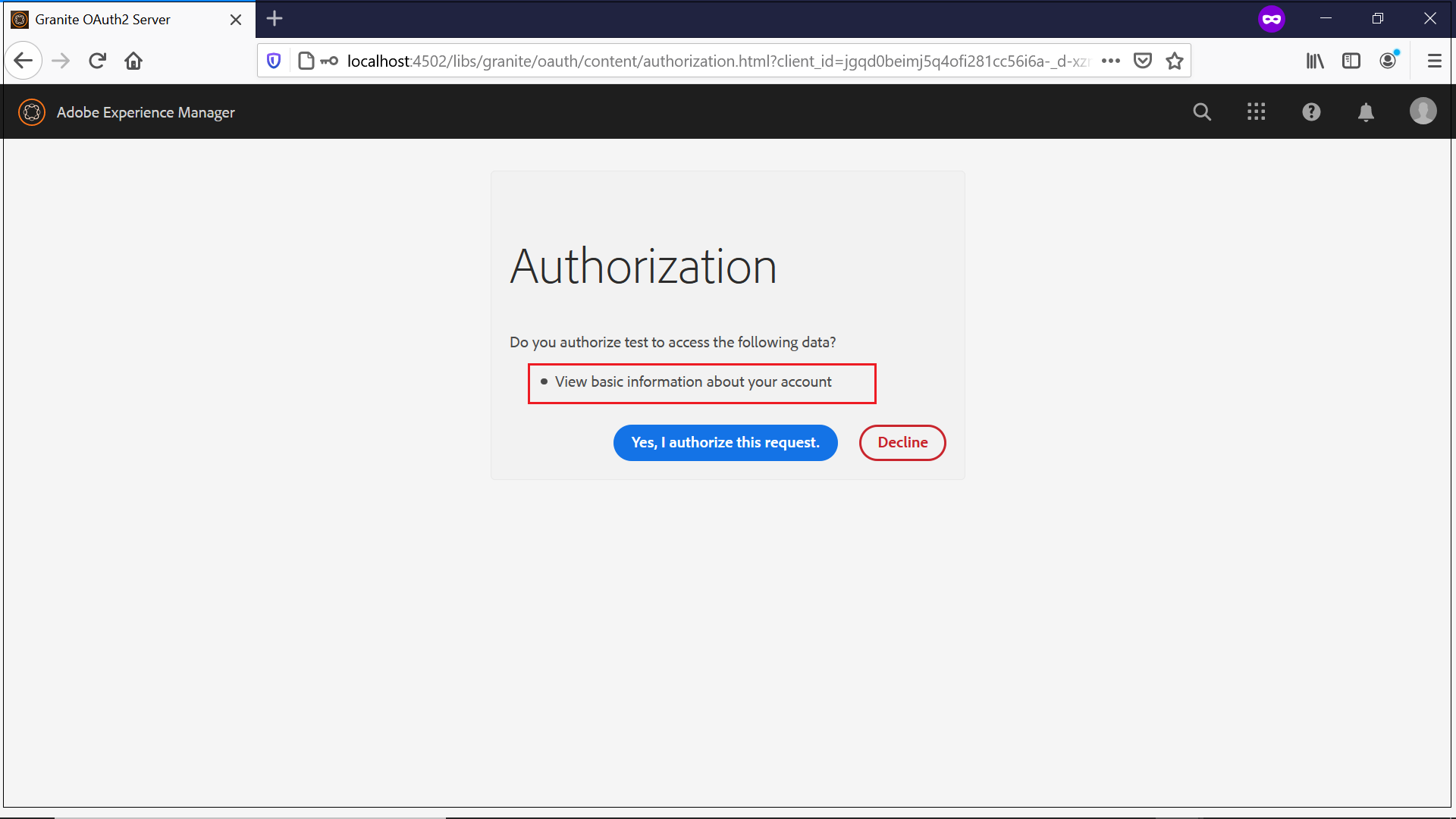
Login with the demo user created in the earlier step, this will display the authorization screen with permissions granted to the external application.

oauth-server-functionalities-in-aem

Now the user authorize the request, the user will be returned to the client application with authorization code as the parameter.

http://localhost:8080/testapp?code=eyJhbGciOiJIUzI1NiIsInR5cCI6IkpXVCJ9.eyJhdWQiOiJqZ3FkMGJlaW1qNXE0b2ZpMjgxY2M1Nmk2YS1fZC14em4tZSIsInN1YiI6ImFsYmluIiwiZXhwIjoxNTk3MTEyNzcxLCJpYXQiOjE1OTcxMTIxNzEsInNjb3BlIjoicHJvZmlsZSIsImN0eSI6ImNvZGUifQ.aX1fRez64FmY5dMdIuoTP3QpQhjc5Kyo50TJzZJ7fT4&state=null

Now get the access token through the authorization code, I am using curl command for demo

curl -H “Content-Type:application/x-www-form-urlencoded” -d “code=eyJhbGciOiJIUzI1NiIsInR5cCI6IkpXVCJ9.eyJhdWQiOiJqZ3FkMGJlaW1qNXE0b2ZpMjgxY2M1Nmk2YS1fZC14em4tZSIsInN1YiI6ImFsYmluIiwiZXhwIjoxNTk3MTEzMTI4LCJpYXQiOjE1OTcxMTI1MjgsInNjb3BlIjoicHJvZmlsZSIsImN0eSI6ImNvZGUifQ.TbsP8xptOPwcYpJKK-STkVJ2E6_62MbhRf0_2otV21o&grant_type=authorization_code&redirect_uri=http://localhost:8080/testapp&client_id=jgqd0beimj5q4ofi281cc56i6a-_d-xzn-e&client_secret=mpuprfm0rob20ed5cv87bhfoe4http://localhost:4502/oauth/token

{   "access_token":"eyJhbGciOiJIUzI1NiIsInR5cCI6IkpXVCJ9.eyJhdWQiOiJqZ3FkMGJlaW1qNXE0b2ZpMjgxY2M1Nmk2YS1fZC14em4tZSIsImlzcyI6IkFkb2JlIEdyYW5pdGUiLCJzdWIiOiJhbGJpbiIsImV4cCI6MTU5NzExNzE4MywiaWF0IjoxNTk3MTEzNTgzLCJzY29wZSI6InByb2ZpbGUiLCJjdHkiOiJhdCJ9.PKBvXeFU3UDKHPFh23Nq2D6qSMa4GkMkPBYaXPoVFlM","expires_in":3600
}

Now get the profile data through the access token

curl -H “Authorization: Bearer eyJhbGciOiJIUzI1NiIsInR5cCI6IkpXVCJ9.eyJhdWQiOiJqZ3FkMGJlaW1qNXE0b2ZpMjgxY2M1Nmk2YS1fZC14em4tZSIsImlzcyI6IkFkb2JlIEdyYW5pdGUiLCJzdWIiOiJhbGJpbiIsImV4cCI6MTU5NzExNjUwMywiaWF0IjoxNTk3MTEyOTAzLCJzY29wZSI6InByb2ZpbGUiLCJjdHkiOiJhdCJ9.c-A9wVja2JGfdDURPirLQPlZSisa8lAIlcTvBduhaFQ” http://localhost:4502/libs/oauth/profile

{
"gender_xss":"male",
"gender":"male",
"aboutMe_xss":"test",
"aboutMe":"test",
"phoneNumber_xss":"123456",
"phoneNumber":"123456",
"street_xss":"test",
"street":"test",
"city_xss":"test",
"city":"test",
"email_xss":"
[email protected]",
"email":"
[email protected]",
"title_xss":"Mr.",
"title":"Mr.",
"familyName_xss":"Issac",
"familyName":"Issac",
"country_xss":"United States",
"country":"United States",
"givenName_xss":"Albin",
"givenName":"Albin",
"postalCode_xss":"123456",
"postalCode":"123456"
}

DAM Read & Write — Custom Scopes

Let us now enable a custom scope to read the DAM data, configure as required and deploy the scope

import javax.servlet.http.HttpServletRequest;import org.apache.jackrabbit.api.security.user.User;
import org.osgi.service.component.annotations.Component;
import com.adobe.granite.oauth.server.Scope;
import com.adobe.granite.oauth.server.ScopeWithPrivileges;
@Component(service=Scope.class)
public class DAMReadScope implements ScopeWithPrivileges{

private static final String DAM_RESOURCE_URI="/content/dam/digital";
private static final String DAM_RESOURCE_READ_SCOPE_NAME="dam_read";

public DAMReadScope()
{

}
@Override
public String getDescription(HttpServletRequest arg0) {
return "Read DAM Assets";
}
@Override
public String getEndpoint() {
return null;
}
@Override
public String getName() {
return DAM_RESOURCE_READ_SCOPE_NAME;
}
@Override
public String getResourcePath(User user) {
return DAM_RESOURCE_URI;
}
@Override
public String[] getPrivileges() {
return new String[] {"jcr:read"};
}
}

Enable the required access to “oauthservice” service user, I am enabling the read access for root folder “/”, and full access for /content/dam/digital folder(ReadACL is mandatory for the folder configured in the Scope).

Image for post

As a first step, access the authorization URL and receive the authorization code(refer the profile data section for more details)

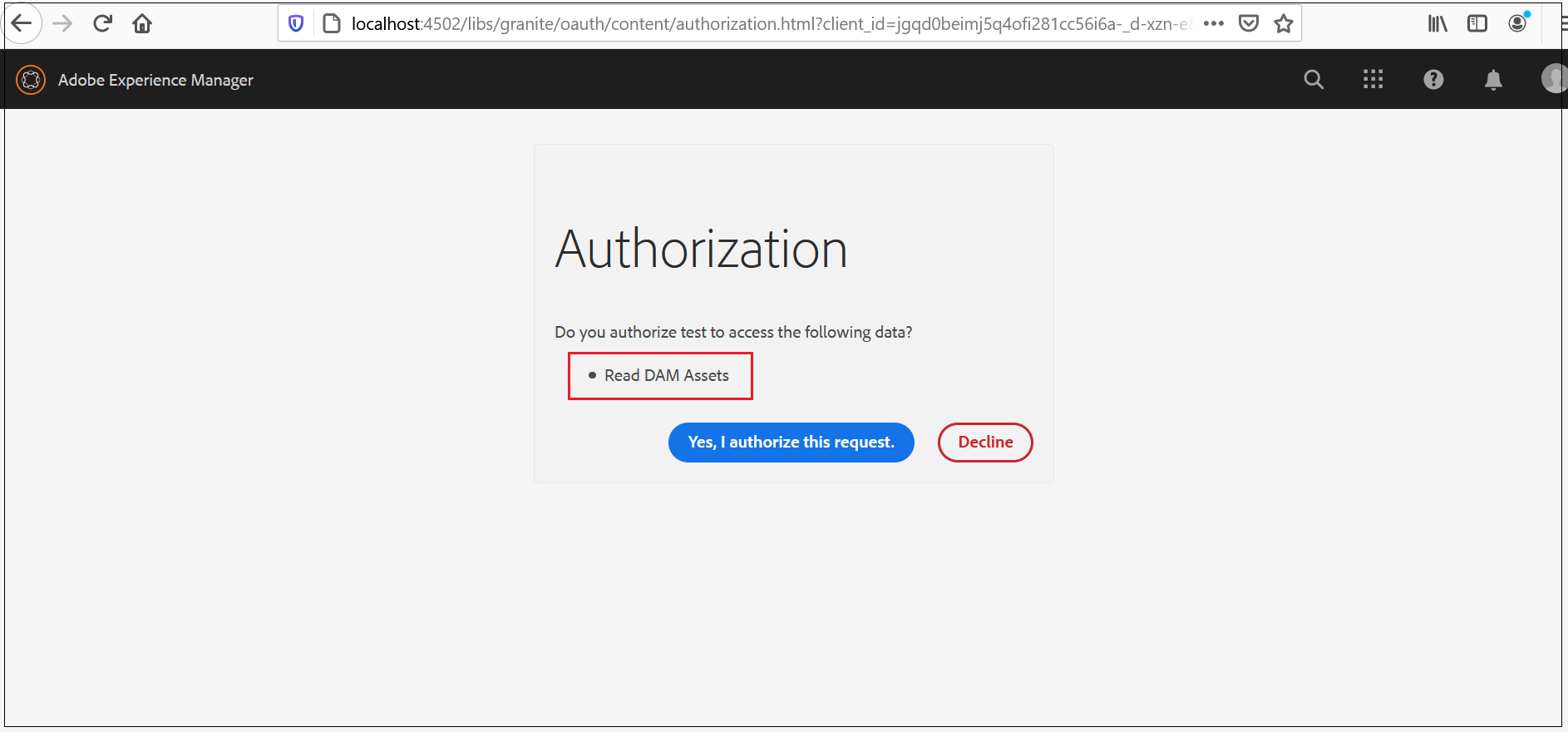
http://localhost:4502/oauth/authorize?response_type=code&client_id=jgqd0beimj5q4ofi281cc56i6a-_d-xzn-e&scope=dam_read&redirect_uri=http://localhost:8080/testapp

oauth-server-functionalities-in-aem

Receive the Access Token with the authorization code

curl -H “Content-Type:application/x-www-form-urlencoded” -d “code=eyJhbGciOiJIUzI1NiIsInR5cCI6IkpXVCJ9.eyJhdWQiOiJqZ3FkMGJlaW1qNXE0b2ZpMjgxY2M1Nmk2YS1fZC14em4tZSIsInN1YiI6ImFsYmluIiwiZXhwIjoxNTk3MTE4NjU2LCJpYXQiOjE1OTcxMTgwNTYsInNjb3BlIjoiZGFtX3JlYWQiLCJjdHkiOiJjb2RlIn0.K6e3wfk1Kz0BWBPm85-nUf2TbOuqtNOBr2ZlHtGr5iI&grant_type=authorization_code&redirect_uri=http://localhost:8080/testapp&client_id=jgqd0beimj5q4ofi281cc56i6a-_d-xzn-e&client_secret=mpuprfm0rob20ed5cv87bhfoe4http://localhost:4502/oauth/token

Now retrieve the asset data through the access token

curl -H “Authorization: Bearer eyJhbGciOiJIUzI1NiIsInR5cCI6IkpXVCJ9.eyJhdWQiOiJnNmIzajl2aTk4bDM5ZmFvNzFpdmc0aDlraC1xM2dydGdoaCIsImlzcyI6IkFkb2JlIEdyYW5pdGUiLCJzdWIiOiJhbGJpbm9hdXRoIiwiZXhwIjoxNTk3MjA5MTM5LCJpYXQiOjE1OTcyMDU1MzksInNjb3BlIjoiZGFtX3JlYWQiLCJjdHkiOiJhdCJ9.kVtKYwG_d-CyQNTCF1D1PaeBoUEZ_JCQAj8AqOk9D74” http://localhost:4502/content/dam/digital/en/asset.jpg > asset.jpg

The specified asset is now downloaded to local machine.

Let us now enable a custom scope to upload the DAM data, configure as required and deploy the scope

import javax.servlet.http.HttpServletRequest;import org.apache.jackrabbit.api.security.user.User;
import org.osgi.service.component.annotations.Component;
import com.adobe.granite.oauth.server.Scope;
import com.adobe.granite.oauth.server.ScopeWithPrivileges;
@Component(service=Scope.class)
public class DAMWriteScope implements ScopeWithPrivileges{

private static final String DAM_RESOURCE_URI="/content/dam/digital";
private static final String DAM_RESOURCE_WRITE_SCOPE_NAME="dam_write";

public DAMWriteScope()
{

}
@Override
public String getDescription(HttpServletRequest arg0) {
return "Upload DAM Assets";
}
@Override
public String getEndpoint() {
return null;
}
@Override
public String getName() {
return DAM_RESOURCE_WRITE_SCOPE_NAME;
}
@Override
public String getResourcePath(User user) {
return DAM_RESOURCE_URI;
}
@Override
public String[] getPrivileges() {
return new String[] {"rep:write","jcr:read"};
}
}

The required access to the service user — “oauthservice” is already enabled.

As a first step, access the authorization URL and receive the authorization code(refer the profile data section for more details)

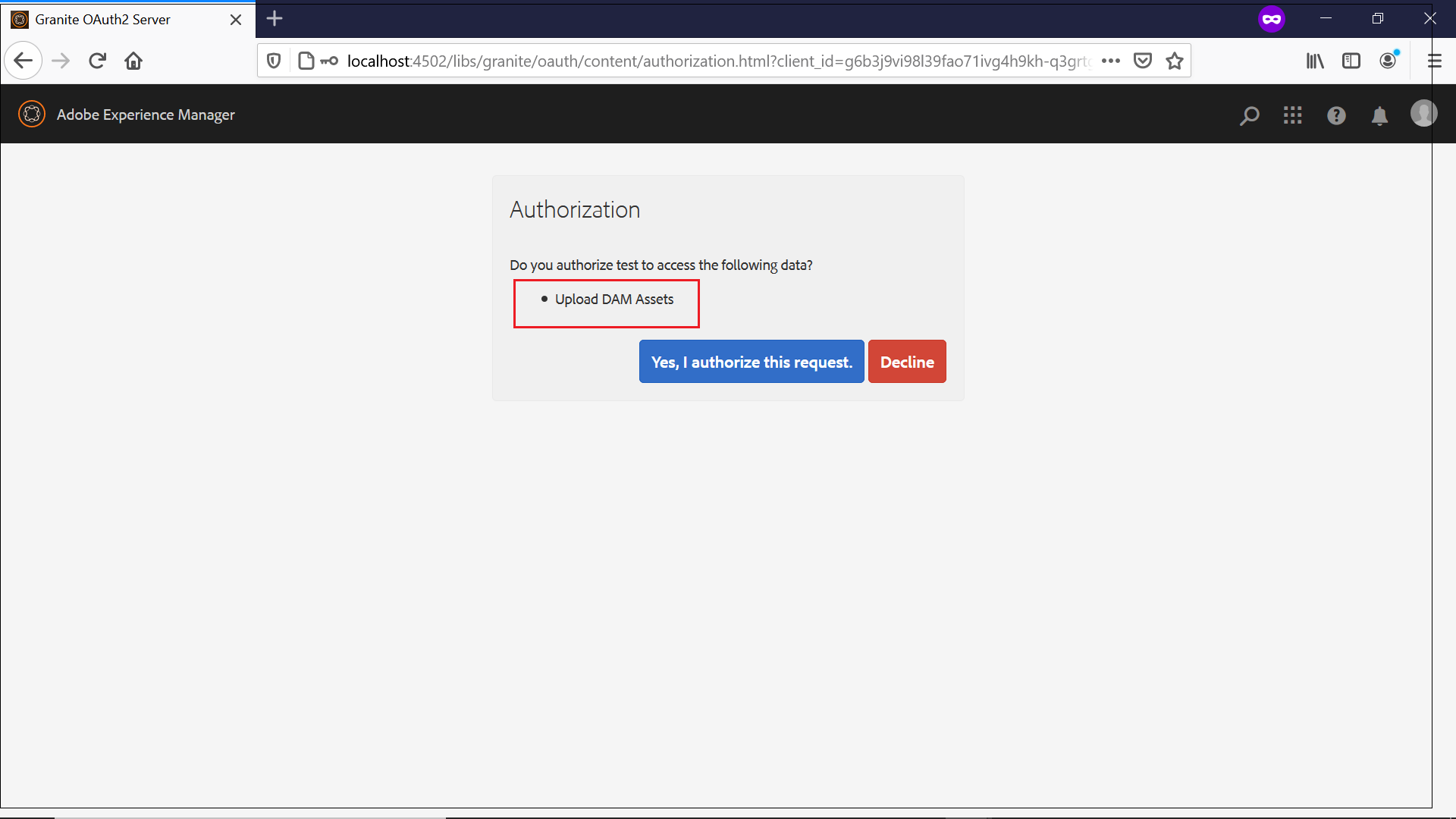
http://localhost:4502/oauth/authorize?response_type=code&client_id=jgqd0beimj5q4ofi281cc56i6a-_d-xzn-e&scope=dam_write&redirect_uri=http://localhost:8080/testapp

oauth-server-functionalities-in-aem

Receive the Access Token with the authorization code

curl -H “Content-Type:application/x-www-form-urlencoded” -d “code=eyJhbGciOiJIUzI1NiIsInR5cCI6IkpXVCJ9.eyJhdWQiOiJnNmIzajl2aTk4bDM5ZmFvNzFpdmc0aDlraC1xM2dydGdoaCIsInN1YiI6ImFsYmlub2F1dGgiLCJleHAiOjE1OTcyNjEyNTUsImlhdCI6MTU5NzI2MDY1NSwic2NvcGUiOiJkYW1fd3JpdGUiLCJjdHkiOiJjb2RlIn0.L-8AU3lLDvwG5rR9U6G4XynEbeb3ktICzaG_mC2NfIE&grant_type=authorization_code&redirect_uri=http://localhost:8080/testapp&client_id=g6b3j9vi98l39fao71ivg4h9kh-q3grtghh&client_secret=83lsvr0glu3opumdthijrnudl8http://localhost:4502/oauth/token

Now upload the asset data to /content/dam/digital folder through the access token

curl -H “Authorization: Bearer eyJhbGciOiJIUzI1NiIsInR5cCI6IkpXVCJ9.eyJhdWQiOiJnNmIzajl2aTk4bDM5ZmFvNzFpdmc0aDlraC1xM2dydGdoaCIsImlzcyI6IkFkb2JlIEdyYW5pdGUiLCJzdWIiOiJhbGJpbm9hdXRoIiwiZXhwIjoxNTk3MjY0NjA4LCJpYXQiOjE1OTcyNjEwMDgsInNjb3BlIjoiZGFtX3dyaXRlIiwiY3R5IjoiYXQifQ.G2C7KLuy7nQ8PlCHfEotxga_p10U_w_acazAe9y0MJo” -X POST -F file=@C:\Users\albin\Desktop\salesforce-cms-connect-to-aem http://localhost:4502/content/dam/digital.createasset.html

The asset is successfully uploaded now.

Image for post

Offline Access

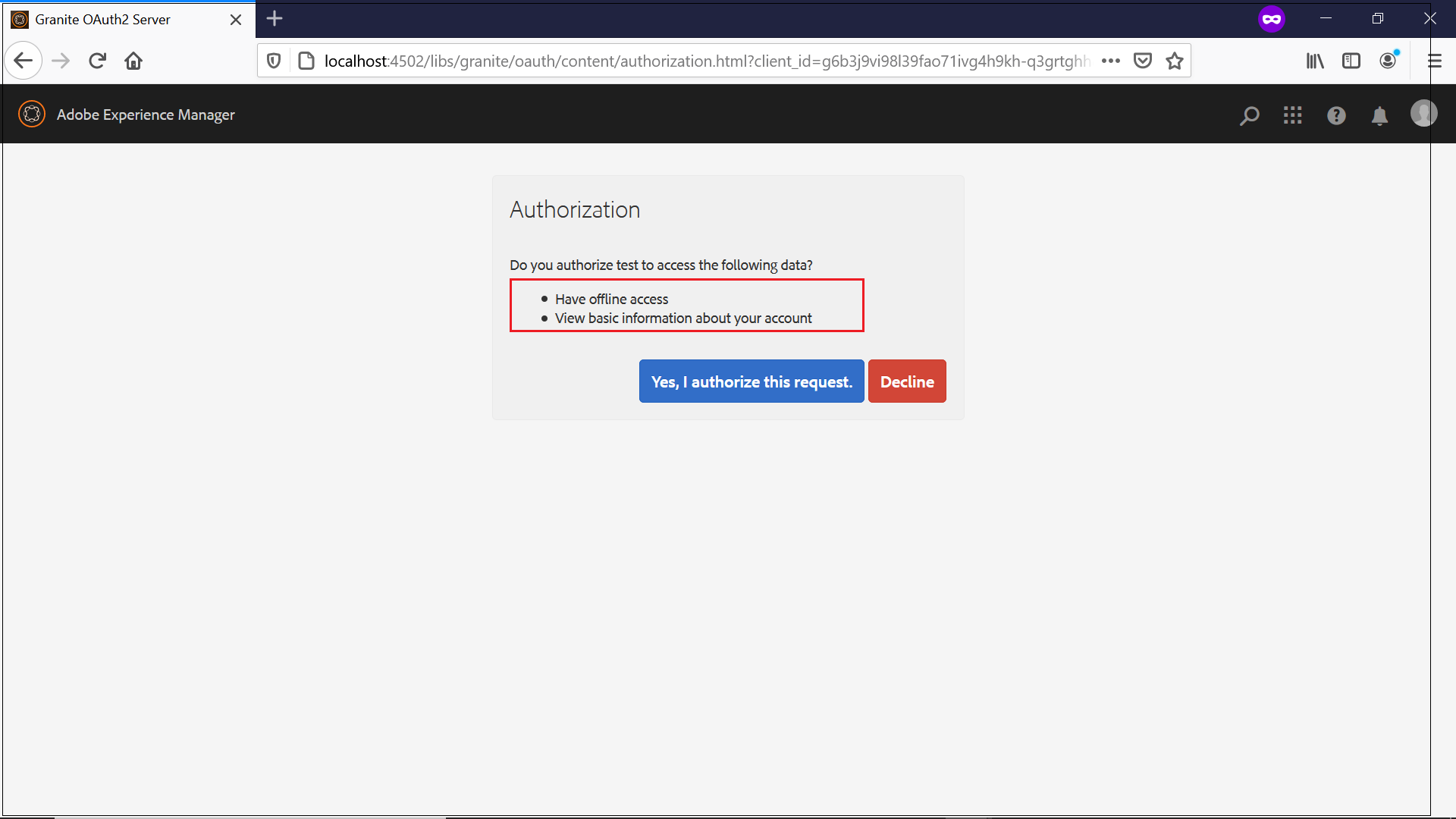
Let us now retrieve the offline token to access the resources without resource owner interaction every time. I am going to receive the offline access token to fetch the user’s profile data whenever required. The offline_access scope should be combined with other scopes e.g profile to fetch the offline token that can be used whenever required to fetch authorized scope data offline e.g profile

As a first step, access the authorization URL and receive the authorization code to fetch the basic user profile data offline(refer the profile data section for more details)

oauth-server-functionalities-in-aem

Receive the Access Token/refresh token(offline access token)with the authorization code

curl -H “Content-Type:application/x-www-form-urlencoded” -d “code=eyJhbGciOiJIUzI1NiIsInR5cCI6IkpXVCJ9.eyJhdWQiOiJnNmIzajl2aTk4bDM5ZmFvNzFpdmc0aDlraC1xM2dydGdoaCIsInN1YiI6ImFsYmlub2F1dGgiLCJleHAiOjE1OTcyNjQ0MDksImlhdCI6MTU5NzI2MzgwOSwic2NvcGUiOiJvZmZsaW5lX2FjY2Vzcyxwcm9maWxlIiwiY3R5IjoiY29kZSJ9.ktynif6GQOlldITxizCioLntyj5SiI8QCOW_KcyODWI&grant_type=authorization_code&redirect_uri=http://localhost:8080/testapp&client_id=g6b3j9vi98l39fao71ivg4h9kh-q3grtghh&client_secret=83lsvr0glu3opumdthijrnudl8http://localhost:4502/oauth/token

{"access_token":"eyJhbGciOiJIUzI1NiIsInR5cCI6IkpXVCJ9.eyJhdWQiOiJnNmIzajl2aTk4bDM5ZmFvNzFpdmc0aDlraC1xM2dydGdoaCIsImlzcyI6IkFkb2JlIEdyYW5pdGUiLCJzdWIiOiJhbGJpbm9hdXRoIiwiZXhwIjoxNTk3MjY3NDk4LCJpYXQiOjE1OTcyNjM4OTgsInNjb3BlIjoib2ZmbGluZV9hY2Nlc3MscHJvZmlsZSIsImN0eSI6ImF0In0.3qu1Qi7zk931senoXVdwmvlnWSxabks0Xfdnm0Y95LM","refresh_token":"eyJhbGciOiJIUzI1NiIsInR5cCI6IkpXVCJ9.eyJhdWQiOiJnNmIzajl2aTk4bDM5ZmFvNzFpdmc0aDlraC1xM2dydGdoaCIsImlzcyI6IkFkb2JlIEdyYW5pdGUiLCJzdWIiOiJhbGJpbm9hdXRoIiwiZXhwIjoxNjI4Nzk5ODk4LCJpYXQiOjE1OTcyNjM4OTgsInNjb3BlIjoib2ZmbGluZV9hY2Nlc3MscHJvZmlsZSIsImN0eSI6InJ0In0.ePDaFSO19PAIZdhKXCkmnv0i4kzf1g49yNYM6cUrsfM","expires_in":3600}

The access token is valid for 3600 sec and can be used to receive the profile data within that time limit, the refresh_token can be used to receive the access_token whenever required to fetch the user’s profile data without the interaction from user.

curl -H “Content-Type:application/x-www-form-urlencoded” -d “refresh_token=eyJhbGciOiJIUzI1NiIsInR5cCI6IkpXVCJ9.eyJhdWQiOiJnNmIzajl2aTk4bDM5ZmFvNzFpdmc0aDlraC1xM2dydGdoaCIsImlzcyI6IkFkb2JlIEdyYW5pdGUiLCJzdWIiOiJhbGJpbm9hdXRoIiwiZXhwIjoxNjI4Nzk5ODk4LCJpYXQiOjE1OTcyNjM4OTgsInNjb3BlIjoib2ZmbGluZV9hY2Nlc3MscHJvZmlsZSIsImN0eSI6InJ0In0.ePDaFSO19PAIZdhKXCkmnv0i4kzf1g49yNYM6cUrsfM&grant_type=refresh_token&redirect_uri=http://localhost:8080/testapp&client_id=g6b3j9vi98l39fao71ivg4h9kh-q3grtghh&client_secret=83lsvr0glu3opumdthijrnudl8http://localhost:4502/oauth/token

{"access_token":"eyJhbGciOiJIUzI1NiIsInR5cCI6IkpXVCJ9.eyJhdWQiOiJnNmIzajl2aTk4bDM5ZmFvNzFpdmc0aDlraC1xM2dydGdoaCIsImlzcyI6IkFkb2JlIEdyYW5pdGUiLCJzdWIiOiJhbGJpbm9hdXRoIiwiZXhwIjoxNTk3MjY3OTAxLCJpYXQiOjE1OTcyNjQzMDEsInNjb3BlIjoib2ZmbGluZV9hY2Nlc3MscHJvZmlsZSIsImN0eSI6ImF0In0.hYVOVztkzXDhkpHVF3UlfGvS6NFfVhBYLlpr6fn1Gow","expires_in":3600}

The access token can be used to fetch the user’s profile data(or other scope data authorized by users)

JWT Bearer Token— Server to Server integration

Let us now see how to use the JWT Bearer token to enable the server to server integration without the resource owner’s intervention.

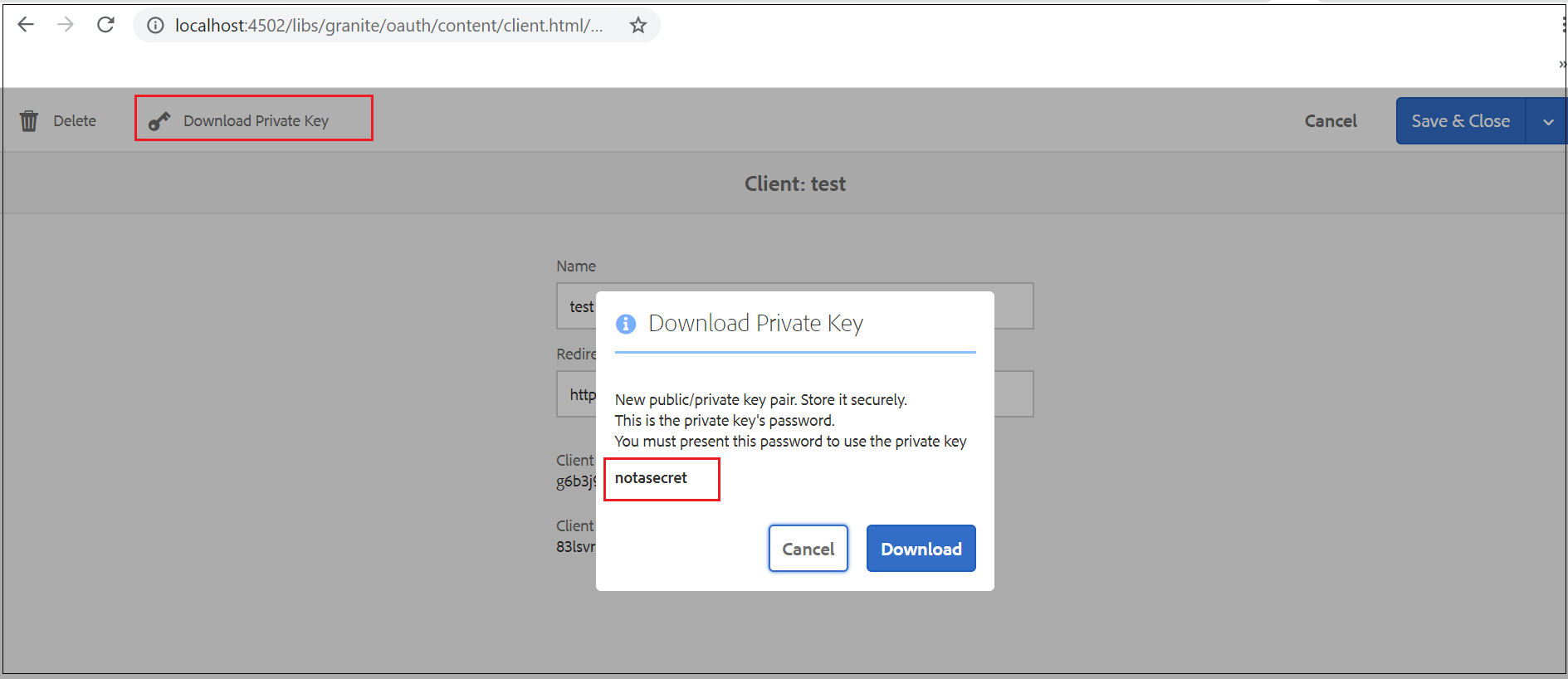
As a first step, download the AEM OAuth client private key to sign the JWT bearer token also note the private key password(keep the private key and password safe)

oauth-server-functionalities-in-aem

Now generate the public certificate from the downloaded private key, execute the below command — Enter the private key password.

openssl pkcs12 -in store.p12 -out store.crt.pem -clcerts -nokeys

Extract the private key

openssl pkcs12 -in store.p12 -passin pass:notasecret -nocerts -nodes -out store.private.key.txt

Let us now create a JWT token signed with the private key generated in the previous step.

You can use any JWT libraries to generate the JWT token for real scenario’s but I am using https://jwt.io/ for demo.

Header

{
"alg": "RS256",
"typ": "JWT"
}

Payload

{
"aud": "<Token Endpoint",
"iss": "<Client Id>",
"sub": "<user name>",
"exp": <Current time in Milliseconds+expiry>,
"iat": <Current time in Milliseconds>,
"scope": "<scope>",
"cty": "code"
}
Image for post

Enter the public certificate and the private key generated in the previous step.

oauth-server-functionalities-in-aem

Now the JWT token is ready, the token can be used to retrieve the access token from AEM.

curl -H “Content-Type:application/x-www-form-urlencoded” -d “assertion=eyJhbGciOiJSUzI1NiIsInR5cCI6IkpXVCJ9.eyJhdWQiOiJodHRwOi8vbG9jYWxob3N0OjQ1MDIvb2F1dGgvdG9rZW4iLCJpc3MiOiJnNmIzajl2aTk4bDM5ZmFvNzFpdmc0aDlraC1xM2dydGdoaCIsInN1YiI6ImFsYmlub2F1dGgiLCJleHAiOjE1OTcyNzM4OTA5NDA2LCJpYXQiOjE1OTcyNzM4MDk0MDYsInNjb3BlIjoiZGFtX3JlYWQiLCJjdHkiOiJjb2RlIn0.EmXLGX9RK-i4OPh-kA8YSTxi8PSJxVtk7uWsYLcMqXY4Z-ZI6pJK_1uLZdJbFxurs3tLqkg300w6w3M99PTrHZg54J2s9SafZyB7psAh6K8ycEvJDHsUDD1ovZvMfQ__tqhMC8yzGFlODLWaAx095fVHO-ce4pewxdzwv3TQK593xwjtwL_hPRqLkjy6Kvt6Cu0TEJd6YFoMNiftca9KxIMEG9fMOpNkHe4rIo_oSqdmiDzbqBZ-0P_3j4gDO_AYnULF9h42NHOrgAxOucfwZbfxgHc8UODUiLw3f1Mw9WGK9POzdFPeruHcknjRf4J60BwestDbFjfHb_8owXAJwA&grant_type=urn:ietf:params:oauth:grant-type:jwt-bearer&redirect_uri=http://localhost:8080/testapp&client_id=g6b3j9vi98l39fao71ivg4h9kh-q3grtghh&client_secret=83lsvr0glu3opumdthijrnudl8http://localhost:4502/oauth/token

Now you should be able to download the assets from /content/dam/digital through the access token(based on the scope used while generating the JWT token)

curl -H “Authorization: Bearer eyJhbGciOiJIUzI1NiIsInR5cCI6IkpXVCJ9.eyJhdWQiOiJnNmIzajl2aTk4bDM5ZmFvNzFpdmc0aDlraC1xM2dydGdoaCIsImlzcyI6IkFkb2JlIEdyYW5pdGUiLCJzdWIiOiJhZG1pbiIsImV4cCI6MTU5NzI3NzYwNSwiaWF0IjoxNTk3Mjc0MDA1LCJzY29wZSI6ImRhbV9yZWFkIiwiY3R5IjoiYXQifQ.g-AXNazPxnAP1VbB8Ym1NB_UFW2MuCmYvsPWuZY-jfQ” http://localhost:4502/content/dam/digital/en/asset.jpg > asset.jpg

Token Revocation

The access token granted by the OAuth authorization server(AEM) can be used by the clients to access the protected resources from AEM. Sometimes we may need to revoke the access tokens granted to the clients due to various reasons, AEM provides different options to revoke the tokens.

Client Token Revocation — Revoke all the access tokens granted under specific OAuth client. In this scenario, the tokens can be revoked by the user who created/manages the OAuth client in AEM(my case “admin” user).

As a first step, enable the client revocation through system console — “Adobe Granite OAuth Client Token Revocation Endpoint” http://localhost:4502/system/console/configMgr/com.adobe.granite.oauth.server.impl.OAuth2ClientRevocationServlet

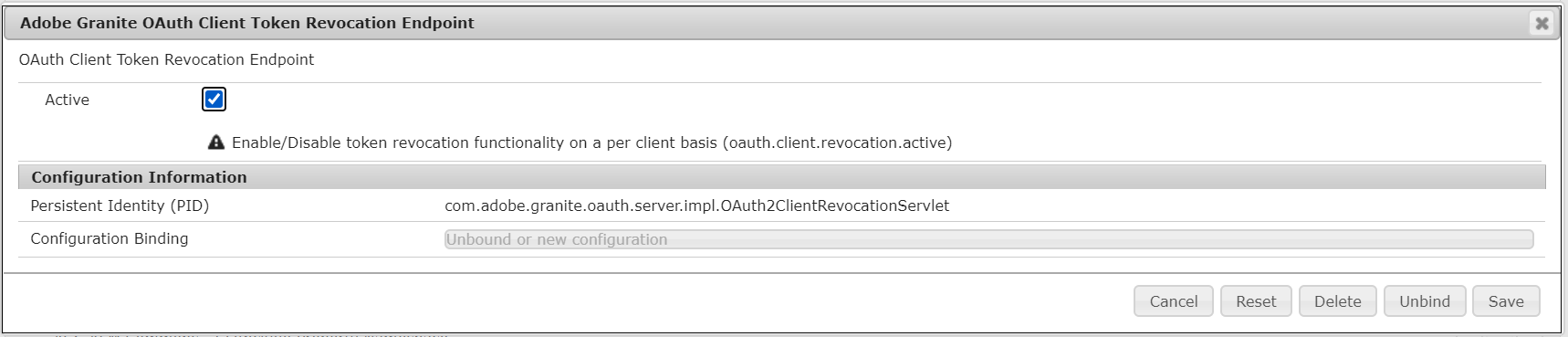
oauth-server-functionalities-in-aem

Now you should have “Revoke All Tokens” option in OAuth Clients to revoke all the access tokens issued for that specific client.

oauth-server-functionalities-in-aem

Revoking Individual Tokens — Revoke the specific individual tokens granted to the clients.

As a first step, enable the individual token revocation through system console — “Adobe Granite OAuth Token Revocation Endpoint” http://localhost:4502/system/console/configMgr/com.adobe.granite.oauth.server.impl.OAuth2RevocationEndpointServlet

Image for post

Now the individual token revocation is enabled, the individual tokens can be revoked through — http://localhost:4502/libs/granite/oauth/content/tokens.html. The individual tokens should be revoked by the user who granted the access tokens, in my case “albin”

oauth-server-functionalities-in-aem

Revoking Individual Tokens through Service — AEM provides API to revoke the access tokens granted to the clients.

As a first step, enable the API revocation through system console — “Adobe Granite OAuth Revocation Endpoint” http://localhost:4502/system/console/configMgr/com.adobe.granite.oauth.server.impl.OAuth2RevocationEndpointServlet. The individual token should be revoked by the user who granted the access tokens, in my case “albin”

oauth-server-functionalities-in-aem

Now the API token revocation is enabled, the individual tokens can be revoked through http://localhost:4502/libs/granite/oauth/revoke

curl -u “albin:Welcome123!” -H “Content-Type:application/x-www-form-urlencoded” -d “token=eyJhbGciOiJIUzI1NiIsInR5cCI6IkpXVCJ9.eyJhdWQiOiJnNmIzajl2aTk4bDM5ZmFvNzFpdmc0aDlraC1xM2dydGdoaCIsImlzcyI6IkFkb2JlIEdyYW5pdGUiLCJzdWIiOiJhbGJpbm9hdXRoIiwiZXhwIjoxNTk3MjgwODA2LCJpYXQiOjE1OTcyNzcyMDYsInNjb3BlIjoiZGFtX3JlYWQiLCJjdHkiOiJhdCJ9.rsAguVQgBSLS-SM-WeIo-t3gKyAaCZTPDIqvP9wyY7s” http://localhost:4502/libs/granite/oauth/revoke


As a conclusion, Adobe granite OAuth 2.0 server implementation(com.adobe.granite.oauth.server) provides the support for OAuth 2.0 server functionalities in AEM. The AEM OAuth 2.0 server functionalities can be used to manage the protected resources from AEM through external clients. The required grants and scopes can be used to manage the resources, if required custom scopes can be defined to provide custom resource access.

Saturday, June 8, 2019

How to Setup Job Offloading in AEM Author Instance - Asset Process Offloading?

How to Setup Job Offloading in AEM Author Instance - Asset Process Offloading?


This video explains how to Setup Job Offloading in AEM Author Instance - Asset Process Offloading


Wednesday, June 5, 2019

How to migrate the existing AEM instance to cloud storage – S3 bucket?

How to migrate the existing AEM instance to cloud storage – S3 bucket?

This video explains how to migrate the existing AEM instance to cloud storage – S3 bucket


Saturday, June 1, 2019

java.lang.NoClassDefFoundError: javax/net/ssl/TrustManager - Issue while connecting to database through JDBC Connection Pool in AEM

java.lang.NoClassDefFoundError: javax/net/ssl/TrustManager - Issue while connecting to database through Connection Pool in AEM 


I was getting the below exception while trying to connect to MySQL database through JDBC connection pool in AEM 6.4 with Java 1.8

Exception:
java.lang.NoClassDefFoundError: javax/net/ssl/TrustManager
at com.mysql.cj.protocol.a.NativeProtocol.negotiateSSLConnection(NativeProtocol.java:334)
at com.mysql.cj.protocol.a.NativeAuthenticationProvider.negotiateSSLConnection(NativeAuthenticationProvider.java:777)
at com.mysql.cj.protocol.a.NativeAuthenticationProvider.proceedHandshakeWithPluggableAuthentication(NativeAuthenticationProvider.java:486)
at com.mysql.cj.protocol.a.NativeAuthenticationProvider.connect(NativeAuthenticationProvider.java:202)
at com.mysql.cj.protocol.a.NativeProtocol.connect(NativeProtocol.java:1452)
at com.mysql.cj.NativeSession.connect(NativeSession.java:165)
at com.mysql.cj.jdbc.ConnectionImpl.connectOneTryOnly(ConnectionImpl.java:955)
at com.mysql.cj.jdbc.ConnectionImpl.createNewIO(ConnectionImpl.java:825)
at com.mysql.cj.jdbc.ConnectionImpl.<init>(ConnectionImpl.java:455)
at com.mysql.cj.jdbc.ConnectionImpl.getInstance(ConnectionImpl.java:240)
at com.mysql.cj.jdbc.NonRegisteringDriver.connect(NonRegisteringDriver.java:199)
at java.sql.DriverManager.getConnection(Unknown Source)
at aemmysql.core.servlets.FirstServletSelector1.doGet(FirstServletSelector1.java:32)


Configured the Data source as below:

AEM-datasourcepool-mysql

Code:

import org.apache.sling.api.SlingHttpServletRequest;
import org.apache.sling.api.SlingHttpServletResponse;
import org.apache.sling.api.servlets.HttpConstants;
import org.apache.sling.api.servlets.SlingAllMethodsServlet;
import org.osgi.framework.Constants;
import org.osgi.service.component.annotations.Component;

import javax.servlet.Servlet;
import javax.servlet.ServletException;
import java.io.IOException;
import java.sql.*; 
import com.day.commons.datasource.poolservice.DataSourcePool;
import javax.sql.DataSource;
import org.osgi.service.component.annotations.Reference; 

@Component(service=Servlet.class,
           property={
                   Constants.SERVICE_DESCRIPTION + "=Simple Demo Servlet",
                   "sling.servlet.methods=" + HttpConstants.METHOD_GET,
                   "sling.servlet.paths="+ "/bin/servlet/mysqldata"                   
           })
public class FirstServletSelector1 extends SlingAllMethodsServlet {
 @Reference
 private DataSourcePool dataSourceService;
    protected void doGet(SlingHttpServletRequest request, SlingHttpServletResponse response)
    throws ServletException, IOException {         
     try{  
Connection con=((DataSource) dataSourceService.getDataSource("SampleOracleDS")).getConnection();;  
Statement stmt=con.createStatement();  
ResultSet rs=stmt.executeQuery("select * from sample");  
while(rs.next())  
System.out.println(rs.getInt(1)+"  "+rs.getString(2)+"  "+rs.getString(3));  
con.close();
}catch(Exception e){
System.out.println(e);
}        
    }
}

Configured the Import-Package in the core bundle pom.xml with com.mysql.cj.jdbc

<Import-Package>com.mysql.cj.jdbc,javax.inject;version=0.0.0,*</Import-Package>

Downloaded the connector jar from the following location and installed JAR to AEM server by converting to OSGI bundle


The same exception was displayed even after adding the javax.net.ssl package as part of the Import-Package in MySQL connector OSGI bundle.

After little struggle  i found that the package javax.net.ssl should be added to org.osgi.framework.bootdelegation property in crx-quickstart\conf\sling.properties

org.osgi.framework.bootdelegation=javax.net.ssl,com.yourkit.*, ${org.apache.sling.launcher.bootdelegation}

After restarting the server started getting the below exception

Exception:
java.lang.NoClassDefFoundError: javax/crypto/NoSuchPaddingException
at com.mysql.cj.protocol.a.NativeProtocol.negotiateSSLConnection(NativeProtocol.java:334)
at com.mysql.cj.protocol.a.NativeAuthenticationProvider.negotiateSSLConnection(NativeAuthenticationProvider.java:777)
at com.mysql.cj.protocol.a.NativeAuthenticationProvider.proceedHandshakeWithPluggableAuthentication(NativeAuthenticationProvider.java:486)
at com.mysql.cj.protocol.a.NativeAuthenticationProvider.connect(NativeAuthenticationProvider.java:202)
at com.mysql.cj.protocol.a.NativeProtocol.connect(NativeProtocol.java:1452)
at com.mysql.cj.NativeSession.connect(NativeSession.java:165)
at com.mysql.cj.jdbc.ConnectionImpl.connectOneTryOnly(ConnectionImpl.java:955)
at com.mysql.cj.jdbc.ConnectionImpl.createNewIO(ConnectionImpl.java:825)
at com.mysql.cj.jdbc.ConnectionImpl.<init>(ConnectionImpl.java:455)
at com.mysql.cj.jdbc.ConnectionImpl.getInstance(ConnectionImpl.java:240)
at com.mysql.cj.jdbc.NonRegisteringDriver.connect(NonRegisteringDriver.java:199)
at java.sql.DriverManager.getConnection(Unknown Source)
at aemmysql.core.servlets.FirstServletSelector1.doGet(FirstServletSelector1.java:32)

Additional to javax.net.ssl, the package javax.crypto should be added to org.osgi.framework.bootdelegation property in crx-quickstart\conf\sling.properties

org.osgi.framework.bootdelegation=javax.net.ssl,javax.crypto,com.yourkit.*, ${org.apache.sling.launcher.bootdelegation}

After restarting the server started getting another error

Exception:
java.lang.NoClassDefFoundError: javax/naming/InvalidNameException
at com.mysql.cj.protocol.ExportControlled.getSSLContext(ExportControlled.java:530)
at com.mysql.cj.protocol.ExportControlled.performTlsHandshake(ExportControlled.java:302)
at com.mysql.cj.protocol.StandardSocketFactory.performTlsHandshake(StandardSocketFactory.java:188)
at com.mysql.cj.protocol.a.NativeSocketConnection.performTlsHandshake(NativeSocketConnection.java:99)
at com.mysql.cj.protocol.a.NativeProtocol.negotiateSSLConnection(NativeProtocol.java:352)
at com.mysql.cj.protocol.a.NativeAuthenticationProvider.negotiateSSLConnection(NativeAuthenticationProvider.java:777)
at com.mysql.cj.protocol.a.NativeAuthenticationProvider.proceedHandshakeWithPluggableAuthentication(NativeAuthenticationProvider.java:486)
at com.mysql.cj.protocol.a.NativeAuthenticationProvider.connect(NativeAuthenticationProvider.java:202)
at com.mysql.cj.protocol.a.NativeProtocol.connect(NativeProtocol.java:1452)
at com.mysql.cj.NativeSession.connect(NativeSession.java:165)
at com.mysql.cj.jdbc.ConnectionImpl.connectOneTryOnly(ConnectionImpl.java:955)
at com.mysql.cj.jdbc.ConnectionImpl.createNewIO(ConnectionImpl.java:825)
at com.mysql.cj.jdbc.ConnectionImpl.<init>(ConnectionImpl.java:455)
at com.mysql.cj.jdbc.ConnectionImpl.getInstance(ConnectionImpl.java:240)
at com.mysql.cj.jdbc.NonRegisteringDriver.connect(NonRegisteringDriver.java:199)
at java.sql.DriverManager.getConnection(Unknown Source)
at aemmysql.core.servlets.FirstServletSelector1.doGet(FirstServletSelector1.java:32)

Additional to javax.net.ssl and javax.crypto, the package javax.naming should be added to org.osgi.framework.bootdelegation property in crx-quickstart\conf\sling.properties

org.osgi.framework.bootdelegation=javax.net.ssl,javax.crypto,javax.naming,com.yourkit.*, ${org.apache.sling.launcher.bootdelegation}

The database connectivity is successful after restarting the server.

Refer https://www.albinsblog.com/2015/03/how-to-connect-to-oracle-database-using.html#.XPLN8YhKjIU for complete details on connecting to database through JDBC connection pool.

Wednesday, May 29, 2019

How to enable merge mode for the packages in Adobe Experience Manager(AEM)

How to enable merge mode for the packages in Adobe Experience Manager(AEM)


By default the packages build in AEM package manager is enabled with mode "overwrite", this will overwrite the target folder upon installing the package - the local changes under that folder will be lost.

This post explains the approach to enable the merge mode for the packages, this will help us to merge the package content with the repository content.

Create the package with required path and download to local file system

aem-package-merge-mode


Unzip the package zip file on your computer - jar -xvf test_mode-1.0.zip META-INF/vault/filter.xml

Open the file META-INF/vault/filter.xml in a text editor.

Add mode="merge" to the <filter ...> tag, the merge mode should be added to all the filters defined for example:

 <?xml version="1.0" encoding="UTF-8"?>
<workspaceFilter version="1.0">
<filter root="xxxxx" mode="merge" >
<exclude pattern="xxxxx" />
</filter>
<filter root="xxxx" mode="merge"/>
 </workspaceFilter>

 e.g

<?xml version="1.0" encoding="UTF-8"?>
<workspaceFilter version="1.0">
    <filter root="/content/we-retail/us/en/products/women" mode="merge" />
</workspaceFilter>

Available Filter Modes:


"replace" - This is the normal behavior. Existing content is replaced completely by the imported content, i.e. is overridden or deleted accordingly.

"merge" - Existing content is not modified, i.e. only new content is added and none is deleted or modified.

"update" - Existing content is updated, new content is added and none is deleted.

The default filter mode is "replace"

Re-zip the modified package contents so it includes the change - jar -uvf  test_mode-1.0.zip META-INF/vault/filter.xml
aem-package-merge-mode

Upload the modified package to target server - this will make sure the target server changes are not overwritten.

Sunday, May 19, 2019

How to Setup the AEM Author and Publish Instances with Shared S3 Datastore?

How to Setup the AEM Author and Publish Instances with Shared S3 Datastore?

This video explains how to setup the AEM Author and Publish Instances with Shared S3 Datastore

Sunday, May 12, 2019

How to setup Adobe Experience Manager(AEM) author and publish instances in WebLogic Server

How to setup Adobe Experience Manager(AEM) author and publish instances in WebLogic Server

This video explains how to setup AEM Author and Publish instances in WebLogic Server.


Wednesday, May 8, 2019

How to enable the components in Editable templates - Adobe Experience Manager(AEM)

How to enable the components in Editable templates - Adobe Experience Manager(AEM)


This video explains the steps required to enable the components in Editable templates - Adobe Experience Manager(AEM)


Resource-Only Cache Invalidation - Adobe Experience Manager(AEM)

Resource-Only Cache Invalidation - Adobe Experience Manager(AEM)

This video explains the approach to setup Resource-Only Cache Invalidation in Adobe Experience Manager(AEM)


AEM Content Fragment - Deep Dive

AEM Content Fragment - Deep Dive

This video deep dive into AEM Content Fragment


Adobe Search and Promote - Deep Dive

Adobe Search and Promote - Deep Dive

This video deep dive into Adobe Search and Promote


Grant access for additional users to OSGI System Console

Grant access for additional users to OSGI System Console

This video explains the steps to Grant access for additional users to OSGI System Console


How to Disable the Minification for specific client libraries(Java Script/CSS) in AEM

How to Disable the Minification for specific client libraries(Java Script/CSS) in AEM

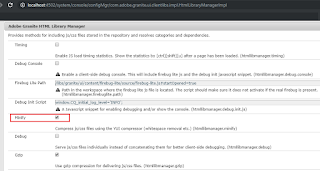
Disable through Adobe Granite HTML Library Manager

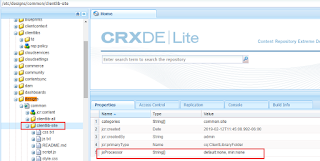
Disable Minfication for specific client libraries


How to enable the access to ClientLibs under apps folder - Adobe Experience Manager(AEM)

How to enable the access to ClientLibs under apps folder - Adobe Experience Manager(AEM)

This video explains the approach to enable the access to ClientLibs under apps folder in Adobe Experience Manager(AEM)


How to clear the cache - JSP/Classes/HTML/JS and ClientLibs in AEM

How to clear the cache - JSP/Classes/HTML/JS and ClientLibs in AEM

This video explains the different approaches in AEM to clear the JSP/Classes/HTML/JS and ClientLibs caches


How to integrate Adobe Experience Manager(AEM) with Magento ecommerce platform - part3

How to integrate Adobe Experience Manager(AEM) with Magento ecommerce platform - part2

This video explains the AEM configuration details required to integrate Adobe Experience Manager(AEM) with Magento ecommerce platform


How to integrate Adobe Experience Manager(AEM) with Magento ecommerce platform - part2

How to integrate Adobe Experience Manager(AEM) with Magento ecommerce platform - part2

This video explains the AEM configuration details required to integrate Adobe Experience Manager(AEM) with Magento ecommerce platform


How to integrate Adobe Experience Manager(AEM) with Magento ecommerce platform - part1

How to integrate Adobe Experience Manager(AEM) with Magento ecommerce platform - part1

This video explains the AEM configuration details required to integrate Adobe Experience Manager(AEM) with Magento ecommerce platform


Tuesday, May 7, 2019

nmEnroll/nmConnect commands fails on windows server- Weblogic 12.2.1

nmEnroll and nmConnect  command fails on windows server - Weblogic 12.2.1


The enroll of a domain with node manager and connecting to a node manager was failing in windows server for Weblogic 12.2.1

Steps followed to Enroll the domain:


Execute the following commands in command prompt

C:\Albin\SW\Weblogic\oracle\wlserver\common\bin\wlst.cmd

connect('weblogic','Albin123!','t3://localhost:7001')

nmEnroll('C:\Albin\SW\Weblogic\oracle\user_projects\domains\base_domain','C:\Albin\SW\Weblogic\oracle\user_projects\domains\base_domain\nodemanager')

nmConnect('weblogic', 'Albin123!', 'localhost', '5556', 'base_domain' ,'C:\Albin\SW\Weblogic\oracle\user_projects\domains\base_domain','ssl')

Error:


wls:/base_domain/serverConfig/> nmEnroll('C:\Albin\SW\Weblogic\oracle\user_projects\domains\base_domain','C:\Albin\SW\Weblogic\oracle\user_projects\domains\base_domain\nodemanager')
Enrolling this machine with the domain directory at C:\Albin\SW\Weblogic\oracle\user_projects\domainase_domain ...
Traceback (innermost last):
  File "<console>", line 1, in ?
  File "<iostream>", line 1661, in nmEnroll
  File "<iostream>", line 553, in raiseWLSTException
WLSTException: Error occurred while performing nmEnroll : Problem enrolling the machine. : C:\Albin\SW\Weblogic\oracle\user_projects\domainase_domain\security\SerializedSystemIni.dat (The filename, directory name, or volume label syntax is incorrect)
Use dumpStack() to view the full stacktrace :


The_filename_directory_name,_volume_label_syntax_incorrect

wls:/base_domain/serverConfig/> nmConnect('weblogic', 'Albin123!', 'localhost', '5556', 'base_domain' ,'C:\Albin\SW\Weblogic\oracle\user_projects\domains\base_domain','ssl')
Connecting to Node Manager ...
<May 7, 2019 9:35:58 PM CDT> <Info> <Security> <BEA-090905> <Disabling the CryptoJ JCE Provider self-integrity check for better startup performance. To enable this check, specify -Dweblogic.security.allowCryptoJDefaultJCEVerification=true.>
<May 7, 2019 9:35:58 PM CDT> <Info> <Security> <BEA-090906> <Changing the default Random Number Generator in RSA CryptoJ from ECDRBG128 to HMACDRBG. To disable this change, specify -Dweblogic.security.allowCryptoJDefaultPRNG=true.>
<May 7, 2019 9:35:58 PM CDT> <Info> <Security> <BEA-090909> <Using the configured custom SSL Hostname Verifier implementation: weblogic.security.utils.SSLWLSHostnameVerifier$NullHostnameVerifier.>
Traceback (innermost last):
  File "<console>", line 1, in ?
  File "<iostream>", line 111, in nmConnect
  File "<iostream>", line 553, in raiseWLSTException
WLSTException: Error occurred while performing nmConnect : Cannot connect to Node Manager. : Received error message from Node Manager Server: [Processing for domain 'base_domain' failed due to I/O error: [The filename, directory name, or volume label syntax is incorrect]]. Please check Node Manager log for details.
Use dumpStack() to view the full stacktrace :
wls:/base_domain/serverConfig/>

The_filename_directory_name,_volume_label_syntax_incorrect

The domain path on Windows must use double backslash '\\' as the path separator.

The domain was successfully enrolled after executing the below command

nmEnroll('C:\\Albin\\SW\\Weblogic\\oracle\\user_projects\\domains\\base_domain','C:\\Albin\\SW\Weblogic\\oracle\\user_projects\\domains\\base_domain\\nodemanager')

The_filename_directory_name,_volume_label_syntax_incorrect

nmConnect('weblogic', 'Albin123!', 'localhost', '5556', 'base_domain' ,'C:\\Albin\\SW\\Weblogic\\oracle\\user_projects\\domains\\base_domain','ssl')

The_filename_directory_name,_volume_label_syntax_incorrect

Friday, April 12, 2019

Not Found (404) - The requested URL /siteadmin resulted in an error in org.apache.sling.servlets.get.DefaultGetServlet.

Not Found (404) - The requested URL /siteadmin resulted in an error in org.apache.sling.servlets.get.DefaultGetServlet.


In one of our AEM(Adobe Experience Manager) environment recently we were facing 404 issue for all standard URL's like siteadmin, useradmin, welcome.html etc and for the custom content URLs.

The below message has been displayed in the browser while accessing the pages.

Not Found (404)
The requested URL /siteadmin resulted in an error in org.apache.sling.servlets.get.DefaultGetServlet.

Request Progress:
      0 TIMER_START{Request Processing}
      0 COMMENT timer_end format is {<elapsed microseconds>,<timer name>} <optional message>
      3 LOG Method=GET, PathInfo=null
      4 TIMER_START{handleSecurity}
   3166 TIMER_END{3160,handleSecurity} authenticator org.apache.sling.auth.core.impl.SlingAuthenticator@1444cb1f returns true
   3344 TIMER_START{ResourceResolution}
   3438 TIMER_END{93,ResourceResolution} URI=/siteadmin resolves to Resource=JcrNodeResource, type=cq/ui/components/widget, superType=null, path=/apps/wcm/core/content/siteadmin
   3443 LOG Resource Path Info: SlingRequestPathInfo: path='/apps/wcm/core/content/siteadmin', selectorString='null', extension='html', suffix='null'
   3443 TIMER_START{ServletResolution}
   3446 TIMER_START{resolveServlet(/apps/wcm/core/content/siteadmin)}
   3455 TIMER_END{8,resolveServlet(/apps/wcm/core/content/siteadmin)} Using servlet org.apache.sling.servlets.get.DefaultGetServlet
   3457 TIMER_END{14,ServletResolution} URI=/siteadmin handled by Servlet=org.apache.sling.servlets.get.DefaultGetServlet
   3459 LOG Applying Requestfilters
   3463 LOG Calling filter: com.adobe.granite.resourceresolverhelper.impl.ResourceResolverHelperImpl
   3469 LOG Calling filter: org.apache.sling.security.impl.ContentDispositionFilter
   3472 LOG Calling filter: org.apache.sling.i18n.impl.I18NFilter
   3476 LOG Calling filter: com.adobe.granite.httpcache.impl.InnerCacheFilter
   3481 LOG Calling filter: org.apache.sling.rewriter.impl.RewriterFilter
   3484 LOG Calling filter: com.adobe.cq.mcm.campaign.servlets.CampaignCopyTracker
   3486 LOG Calling filter: com.day.cq.wcm.core.impl.WCMRequestFilter
   3489 LOG Calling filter: com.adobe.cq.wcm.core.components.internal.servlets.CoreFormHandlingServlet
   3491 LOG Calling filter: com.adobe.granite.optout.impl.OptOutFilter
   3496 LOG Calling filter: com.day.cq.wcm.foundation.forms.impl.FormsHandlingServlet
   3498 LOG Calling filter: com.adobe.cq.social.commons.cors.CORSAuthenticationFilter
   3500 LOG Calling filter: org.apache.sling.engine.impl.debug.RequestProgressTrackerLogFilter
   3513 LOG Calling filter: com.day.cq.wcm.mobile.core.impl.redirect.RedirectFilter
   3515 LOG Calling filter: com.day.cq.wcm.core.impl.AuthoringUIModeServiceImpl
   3518 LOG Calling filter: com.adobe.granite.csrf.impl.CSRFFilter
   3522 LOG Calling filter: com.adobe.granite.rest.assets.impl.AssetContentDispositionFilter
   3525 LOG Calling filter: com.adobe.granite.requests.logging.impl.RequestLoggerImpl
   3528 LOG Calling filter: com.adobe.granite.rest.impl.servlet.ApiResourceFilter
   3822 LOG Calling filter: com.adobe.cq.social.ugcbase.security.impl.SaferSlingPostServlet
   3826 LOG Calling filter: com.day.cq.dam.core.impl.assetlinkshare.AdhocAssetShareAuthHandler
   3831 LOG Calling filter: com.day.cq.dam.core.impl.servlet.ActivityRecordHandler
   3839 LOG Applying Componentfilters
   3841 LOG Calling filter: com.day.cq.personalization.impl.TargetComponentFilter
   3844 LOG Calling filter: com.day.cq.wcm.core.impl.PageLockFilter
   3846 LOG Calling filter: com.day.cq.wcm.core.impl.WCMComponentFilter
   3958 LOG Calling filter: com.day.cq.wcm.core.impl.WCMDebugFilter
   3962 TIMER_START{org.apache.sling.servlets.get.DefaultGetServlet#0}
   3966 LOG No renderer for extension html
   3970 LOG Applying Error filters
   3970 LOG Calling filter: org.apache.sling.i18n.impl.I18NFilter
   3971 LOG Calling filter: org.apache.sling.rewriter.impl.RewriterFilter
   3973 TIMER_START{handleError:status=404}
   4138 TIMER_END{163,handleError:status=404} Using handler org.apache.sling.servlets.resolver.internal.defaults.DefaultErrorHandlerServlet
   5244 LOG Found processor for post processing ProcessorConfiguration: {contentTypes=[text/html], order=-1, active=true, valid=true, processErrorResponse=true, pipeline=(generator=Config(type=htmlparser, config={}), transformers=(Config(type=linkchecker, config={}), Config(type=mobile, config=JcrPropertyMap [node=Node[NodeDelegate{tree=/libs/cq/config/rewriter/default/transformer-mobile: { jcr:primaryType = nt:unstructured, component-optional = true}}], values={jcr:primaryType=nt:unstructured, component-optional=true}]), Config(type=mobiledebug, config=JcrPropertyMap [node=Node[NodeDelegate{tree=/libs/cq/config/rewriter/default/transformer-mobiledebug: { jcr:primaryType = nt:unstructured, component-optional = true}}], values={jcr:primaryType=nt:unstructured, component-optional=true}]), Config(type=contentsync, config=JcrPropertyMap [node=Node[NodeDelegate{tree=/libs/cq/config/rewriter/default/transformer-contentsync: { jcr:primaryType = nt:unstructured, component-optional = true}}], values={jcr:primaryType=nt:unstructured, component-optional=true}]), serializer=Config(type=htmlwriter, config={}))}
   5340 TIMER_END{5339,Request Processing} Dumping SlingRequestProgressTracker Entries
 
The trace says org.apache.sling.servlets.get.DefaultGetServlet is used to render the response instead of specific one in this case it should heave been /libs/cq/ui/components/widget/html.jsp - this was the case for all the pages, default servlet were used for rendering the response.

  3455 TIMER_END{8,resolveServlet(/apps/wcm/core/content/siteadmin)} Using servlet org.apache.sling.servlets.get.DefaultGetServlet

  Based on the analysis

  •   All the bundles were active
  •   CRXDE and system console were accessible with out any issue
  •   There was no recent configuration changes or code deployment
  •   All the standard configurations were looking fine  

  Unfortunately we were not able to identify the root cause, it looks to be the server was not started completely last time.  The issue got resolved after restarting the server.

Tuesday, April 9, 2019

How to use the Request Processing Analyzer to analyze the recent requests in Adobe Experience Manager(AEM)

How to use the Request Processing Analyzer to analyze the recent requests in Adobe Experience Manager(AEM)


The “Recent Requests” is a very useful feature on the OSGi Felix Console to know what going on at each request, how is Sling resolving the resources and the time taken to load the sub resources.

This will help as to debug the resource resolution issues and also to capture the time taken to process the resources.

By default 20 recent request are captured in to the recent request console - http://localhost:4502/system/console/requests

Apache_Sling_Request_Processing_Analyzer

Apache_Sling_Request_Processing_Analyzer

The value "Number of Requests to Record" can be changed in the Apache Sling Main Servlet through OSGI console - http://localhost:4502/system/console/configMgr/org.apache.sling.engine.impl.SlingMainServlet

Also the "Recorded Request Path Patterns" can be specified in Apache Sling Main Servlet configuration to only capture the paths that matches the pattern - e.g capture only the json requests.

Apache_Sling_Request_Processing_Analyzer

Apache_Sling_Request_Processing_Analyzer

Unfortunately this will not help us to trace millions of request through console and also only the recent values will be shown based on the configuration.

Sometimes we may need to analyse huge requests during the load testing to identify the time taken by individual request and to identify the requests that taking more time to process.

Sling Request Processing Analyzer help to achieve the above scenario.

Sling Request Processing Analyzer logs each request in a special file - ${sling.home}/logs/requesttracker.txt with a header line providing core information on the request:

  • Start time stamp in ms since the Epoch
  • Request processing time in ms
  • Request Method
  • Request URL
  • Response content type (plus character encoding if available)
  • Response Status
After that first line the complete data from the requests RequestProgressTracker is dumped.

Configuring Request Processing Analyzer:

  • Download the Request Processing Analyzer bundle from https://github.com/apache/sling-org-apache-sling-reqanalyzer
  • Build the bundle - mvn clean install
  • Install the bundle(org.apache.sling.reqanalyzer-0.0.1-SNAPSHOT.jar) from target folder to server through OSGI console- http://localhost:4502/system/console/bundles


This will create a new log file - requesttracker.txt under ${sling.home}/logs and capture all the request details into the log file.

Apache_Sling_Request_Processing_Analyzer

Analyzing the log file:


The generated log file can be analyzed through the below command.

java -jar C:\sling-org-apache-sling-reqanalyzer-master\target\org.apache.sling.reqanalyzer-0.0.1-SNAPSHOT.jar requesttracker.txt

This will open the Swing GUI with basic request details - click on individual request to see more details about the request

Apache_Sling_Request_Processing_Analyzer

Apache_Sling_Request_Processing_Analyzer

The generated log file can be analyzed through system console - http://localhost:4502/system/console/requestanalyzer

Apache_Sling_Request_Processing_Analyzer
Click on Analyze Now action, this will open the same Swing GUI shown above.

Dumping the details to separate log file:


The Request Process details can be dumped to a separate log file for reference through Apache Sling Request Progress Tracker Log Filter - no bundle is required to be installed but this file can't be analyzed through the approach explained above. The dumped file details can be used for manual analysis.

Define a new logger with below details.

Apache_Sling_Request_Processing_Analyzer

Configure Apache Sling Request Progress Tracker Log Filter

Apache_Sling_Request_Processing_Analyzer

Configure the Extension filter with required file extensions for those the request details should be captured.

Select "Compact Log Format" - this will print the logs fin more readable format.

Apache_Sling_Request_Processing_Analyzer

Friday, April 5, 2019

How to disable the minification for client libraries in Adobe Experience Manager(AEM)

How to disable the minification for client libraries in Adobe Experience Manager(AEM)


Minification refers to the process of removing unnecessary or redundant data without affecting how the resource is processed by the browser - e.g. code comments and formatting, removing unused code, using shorter variable and function names, and so on.

Minfication helps to reduce the size of the resources(Java Script and CSS) and improves the performance of page loading.

Sometimes we may required to disable the minifcation for specific Java script files may be due to the files are already minified or the issue with minification process.

Adobe Granite HTML Library Manager:


Un-select minify option in Adobe Granite HTML Library Manager through configMgr(http://localhost:4502/system/console/configMgr/com.adobe.granite.ui.clientlibs.impl.HtmlLibraryManagerImpl)

disable-minification-clientlibrary-aem

Please note this is a global configuration and it will impact all the client libraries, non of the client libraries will be minified now and this will impact the performance. This approach is not recommended as this will disable the minification for all the client libraries.

Disable Minfication for specific client libraries:


Enable the minification in global configuration(Adobe Granite HTML Library Manager) - http://localhost:4502/system/console/configMgr/com.adobe.granite.ui.clientlibs.impl.HtmlLibraryManagerImpl and disable the minification for required client libraries in client library level. This will only disable the minification for specific client library.

disable-minification-clientlibrary-aem


To disable the minification for specific client library add the below properties to client library node.

To disable Java Script Minification - add jsProcessor String[] default:none, min:none

disable-minification-clientlibrary-aem2.png

Please note jsProcessor String[] default:none was disabling the minification for Java Scripts in AEM 6.2 but the same is not working in AEM 6.4(min:none should be added as additional configuration)

To disable CSS Minification - add cssProcessor String[] default:none, min:none

disable-minification-clientlibrary-aem

Please note cssProcessor String[] default:none was disabling the minification for CSS in AEM 6.2 but the same is not working in AEM 6.4(min:none should be added as additional configuration)